
If you use WordPress you should be using the Post Timestamp feature.
What this handy feature does is allow you to write all of your blog posts at once and time stamp them for delivery all day long. This is very useful if your blog does not contain time sensitive material.
In fact, I am writing this post at 5:23AM today. Yep, I'm writing this post in my underwear and I have not even showered yet! But, you will not even see this post until 2:00PM EST today.
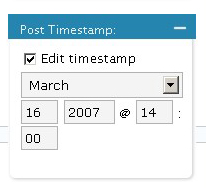
To use the Post Timestamp feature just look to the right of your post (while editing) right below the Post Status options. Just use those little boxes to change the date and time of your post. Be sure to hit the Publish after you change the timestamp so it will be in the upcoming articles que. If you just hit Save it will remain as a draft.
Well, I better get off the computer and get ready for work! I hope you did not think I sat in front on my computer writing all day, did you?


This is the best feature of WordPress that gets little press. I love it!
Funny how many people have written about this feature lately. I read Ryan’s post and I think he actually wrote it before John Chow and now you’re giving us TMI!
It’s good that people are writing about it though. I saw and and never used it (slow on the uptake) and now schedule the next day’s post.
Wordpress Timestamp Feature…
I’ve used Wordpress for a long time, but have never given much thought to the Wordpress Timestamp feature. After reading John Chow’s post on it a few days ago, I’ve been using it. I’m writing this post on Monday March 12, but it…
Cool! so it would automatically publish your posts @ your scheduled time? In Google’s Blogger, we can only write up and save them as draft to manually publish later :P
Andy, you can do this for Blogger as well. However, once you set a future date to publish, I believe you cannot change this date.
What I would really like is an offline writer. I read the Windows Live software could be used, but it doens’t look to good.
There is something for Linux, but it gives an html view, no WYSIWYG, then there is the issue of remote DB access… but I think a good offline writer would go down a storm with WP users.
Are you aware of any other than Windows live software?
A good offline writer? You could just use OpenOffice and cut-and-paste when complete :)
That’s what I do when Im away from an internet connection, but its not ideal….
The only issue I see on this is missing out on pinging for the RSS feed and google XML sitemaps.
This post should spread some light on that http://pilkster.com/wordpress-scheduling-wp-cron-functionality-in-wp-21//
[...] you are following my earlier advice about using the WordPress Timestamp feature to publish your articles you might want to pay attention [...]
[...] you know that you’re not going to be able to post for several days, you should use the WordPress timestamp feature to set up your pre-written articles to post to your blog at predetermined [...]